Open your online store in Algeria, connected to your real stock
With Facturelle, your online store isn't one more website to manage: it's the storefront of your business software. Your items, prices, promotions and stock are already in Facturelle; customers order from their phones, and every order lands directly in your sales.
What your customers see
Your store lives at your own address, app.facturelle.com/boutique/your-store/, and adapts to phone screens. Customers find what matters, with nothing to install.
A clear catalog
Search by name or code, filter by family, a photo for each item with the number of pictures available, selling unit and price including tax. Inactive items and raw materials never appear.
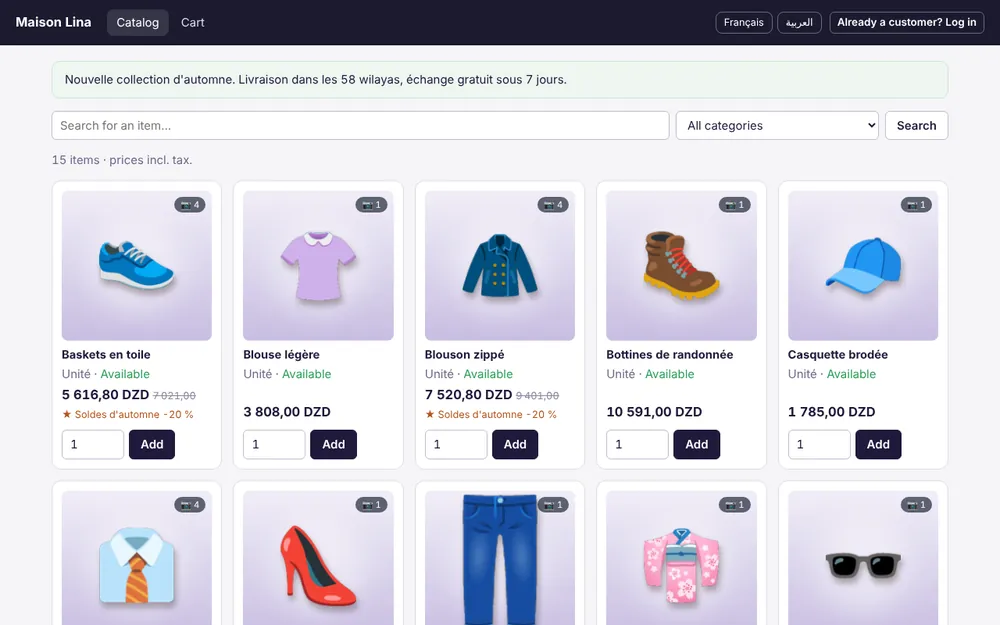
A complete product page
Main photo and gallery, description, price including tax with the old price crossed out when a promotion applies, quantity and an “Add to cart” button. Items sold by weight or volume accept decimal quantities.
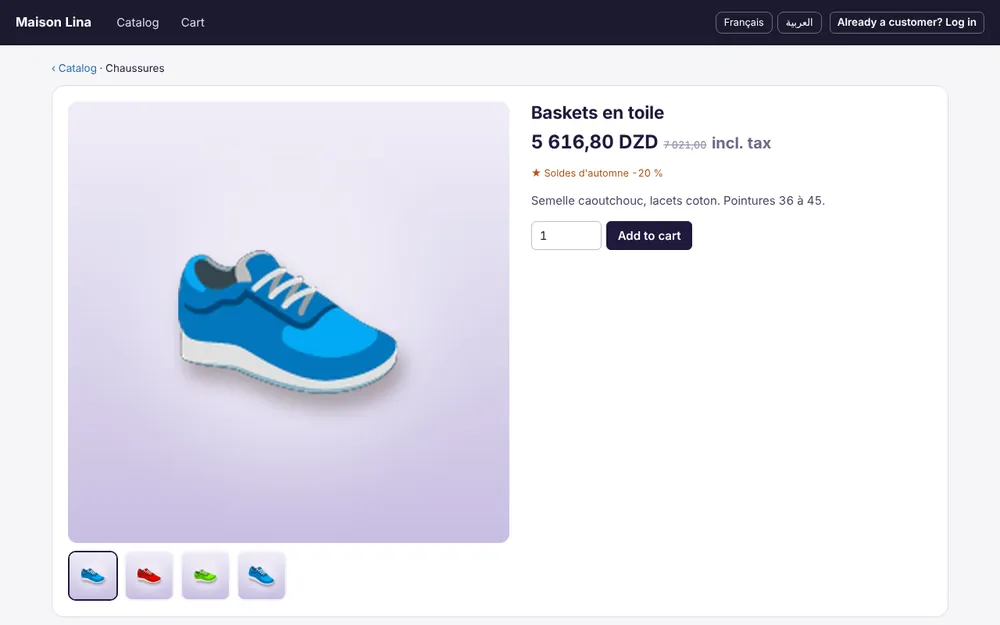
A cart that adds up correctly
Editable quantities, promotions and free units applied automatically, a total including tax calculated with your promotions, and a minimum order amount if you set one.
Availability in one word
“Available” or “Made to order”, based on the real stock of your main warehouse. The exact quantity is never shown to the public.
Order without creating an account
The visitor enters last name, first name, wilaya, delivery address, phone and e-mail, with an optional note for the courier. No account, no password: ordering takes a minute.
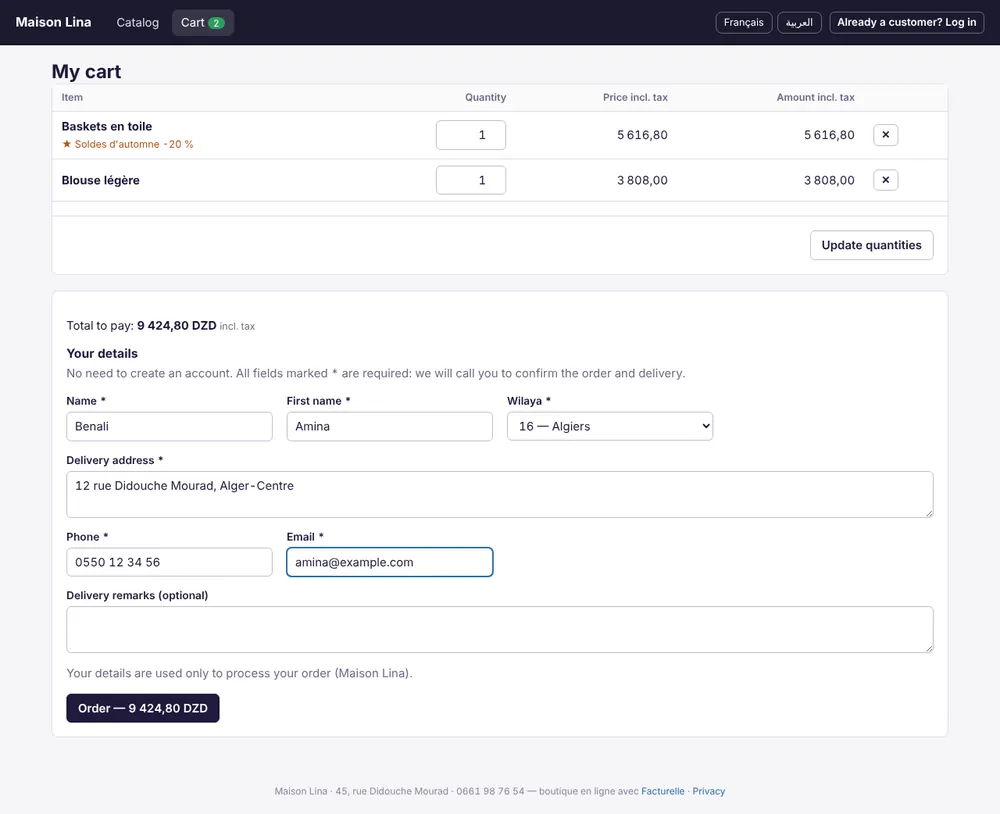
- Algerian phone number checked (mobile 05, 06, 07 or landline).
- On-screen confirmation with the order reference, and a summary sent by e-mail.
- Customer matched by phone number, or created automatically as an individual customer: no duplicates in your customer file.
- Protection against bots and bursts of orders.
- Public price: a discount granted to a given customer is not applied to visitors.
Your settings: one screen
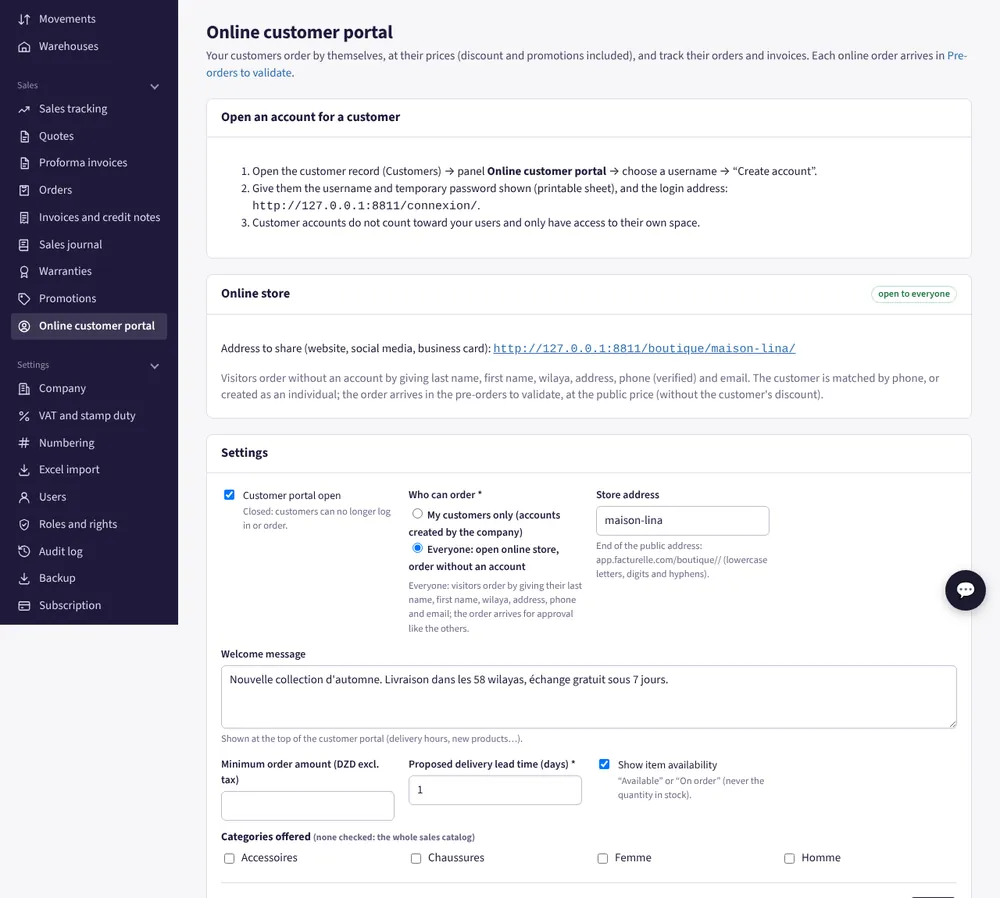
In Online customer portal, you control your store:
- open or close the store with one click;
- choose who can order: everyone, or only your customers (accounts created by you);
- set the store address;
- show a welcome message (opening hours, news, delivery areas);
- set a minimum order amount;
- offer a delivery lead time in days;
- show or hide availability (“Available” / “Made to order”);
- choose the families offered, otherwise your whole sales catalog except raw materials.
From online order to invoice
- The visitor confirms the cart: the order lands in your Orders as a draft, at the public price and with a delivery date calculated from your lead time.
- You check it, call the customer to confirm, correct it if needed, then validate it (or delete the draft).
- Your usual Facturelle flow takes over: delivery note, invoice, payment and stock movement.
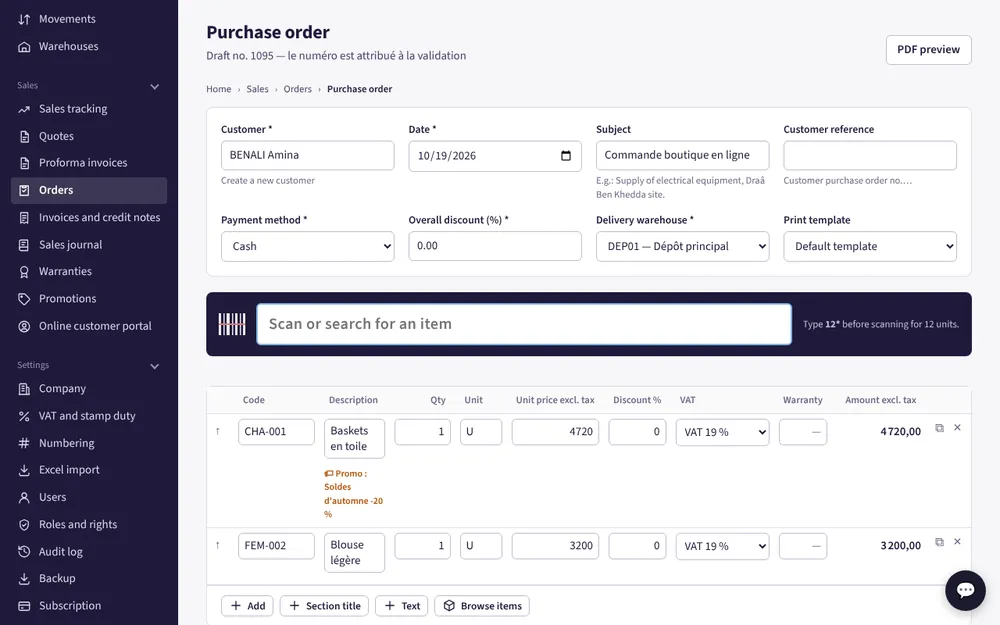
One stock, one invoicing: what you sell online, at the counter or in the field is counted in the same place.
Promotions, photos and variants that help you sell
Automatic promotions
Percentage discount, promotional price or free units (“buy 2, get 1 free”): create them once in Promotions; they show in the store with the old price crossed out and carry into the cart.
Photo gallery
A main photo and a gallery for each item (the number depends on your plan: 5 extra photos with E-Commerce), automatically reduced to load fast on mobile.
Sizes and colors
Selling clothes or shoes? Split a model into variants (size, color): each has its own stock and its own availability.
For business customers: the customer portal
For your resellers, wholesalers or regular customers, open an account from their customer record. They log in and find:
- the catalog at their prices, customer discount and promotions included;
- ordering in a few clicks;
- tracking of their orders;
- their invoices and balance, if you allow it, with PDFs to download.
These accounts don't count toward your users. You can also keep the store for your own customers only.
In French, English and Arabic
The store interface (buttons, cart, checkout form) is shown in French, English or Arabic, right to left, as the visitor chooses. Your item names and descriptions stay exactly as you enter them.
Get started in 4 steps
- Create your account: 30-day free trial, then choose the E-Commerce plan to test.
- Create your families and items (or import them from Excel) and add photos.
- In Online customer portal, choose “Everyone”, your store address and your welcome message.
- Share the link on your website, social networks and business cards.
Up-to-date prices are on the Pricing page.
Frequently asked questions
Do customers need an account to order?
No. Visitors order by entering their last name, first name, wilaya, address, phone and e-mail. You can also keep the store for your own customers, who log in with their account.
Can customers pay online?
Not at the moment. The order is confirmed by phone and settled on your terms, for example on delivery; you then record the payment in Facturelle.
How is item availability handled?
Facturelle checks the real stock of your main warehouse: “Available” if there is some, “Made to order” otherwise. The exact quantity is never shown to the public.
Can I choose which items appear in the store?
Yes: all your active sales items, or only some families. Raw materials and inactive items are never offered.
Is the store available in Arabic?
Yes, in French, English and Arabic (right to left). Visitors switch language with one click; your item names stay as you enter them.
How many photos per item?
One main photo plus a gallery whose size depends on the plan: 5 extra photos with the E-Commerce plan.
Can I try it for free?
Yes. When you sign up you get a 30-day trial and choose the plan to test, E-Commerce included.
Launch your online store
30-day free trial, nothing to install.