Field sales software for distributors: your reps in the field, your orders at the office
Distributor, wholesaler or manufacturer, you sell through reps who visit grocers, mini-markets, cafés and restaurants. Facturelle plans their routes, lets them take orders on their phones, even without a network, and puts the figures straight in front of sales administration and management.
Why field sales software?
Without a tool, pre-sales runs on notebooks, phone calls and order slips retyped at the office: lost orders, forgotten customers, uncontrolled discounts, cash that is hard to reconcile. Field sales software puts this flow back in order:
- each rep knows who to visit today and in what order;
- each order reaches the office immediately, at the right price;
- management sees who visited whom, with what results.
In Facturelle, field sales is connected to the rest of the business: stock, delivery notes, invoices, payments. Nothing is retyped.
Organise the field: zones, teams, portfolios
- Organisation: regions, teams and managers; each manager only sees their own reps.
- Zones drawn on the map or made of whole communes and wilayas. Customers are attached automatically.
- Customers: GPS position, channel, potential, visit slots and frequency. The assignment check lists customers with no rep, no position or duplicates.
- Flexible or strict assignment: a rep may help out with a colleague's customer, or each customer is reserved for their rep.
- Absence or departure of a rep: their routes or portfolio go to one or more replacements, after a preview.
Plan the routes
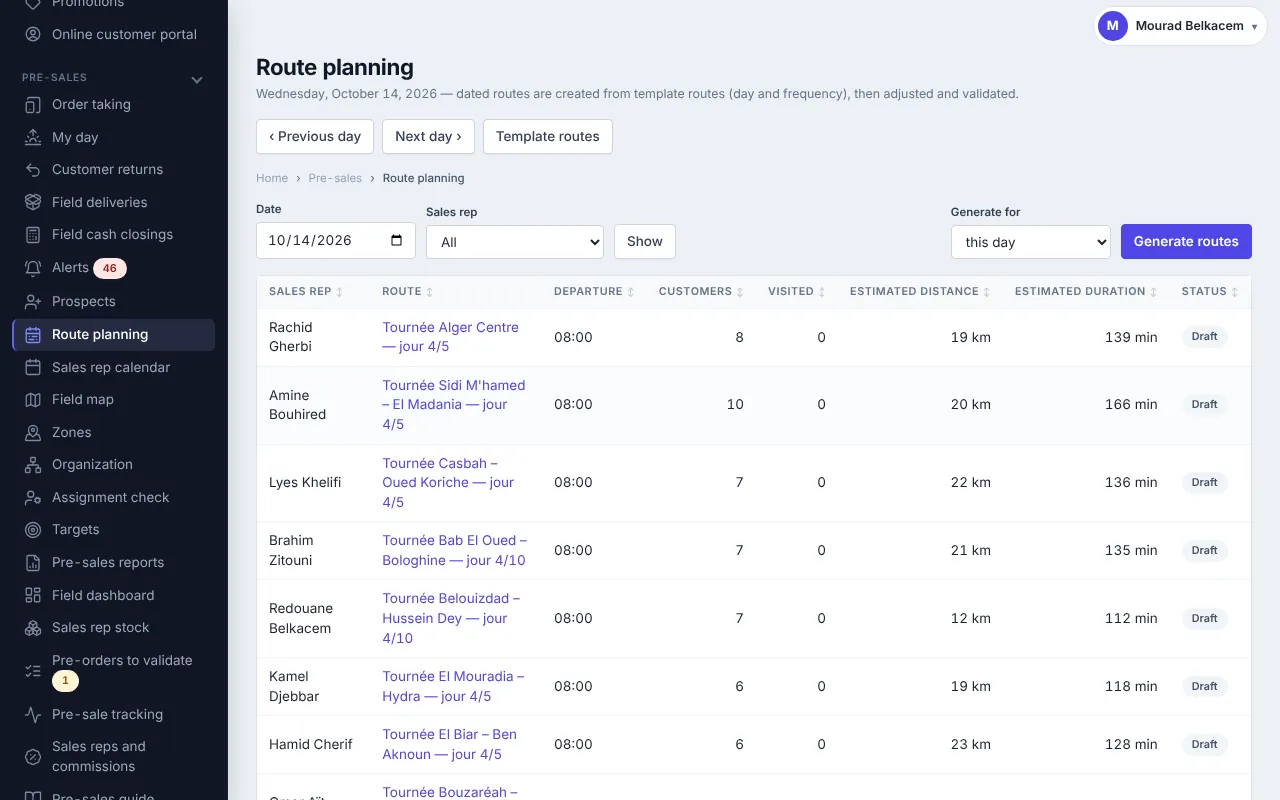
Create routes on a cycle of N working days (3, 5, 10…) or on a fixed weekday, and spread customers day by day. The calendar takes each rep's working days, public holidays and leave into account.
The planner then generates dated routes with planned times, travel, break and return. You adjust them (add, remove, shortest suggested order); Facturelle flags what needs review (customer outside their slots, day too long, too many visits) and suggests customers overdue for a visit. Once validated, the rep finds the route on their phone.
The rep's day, on their phone
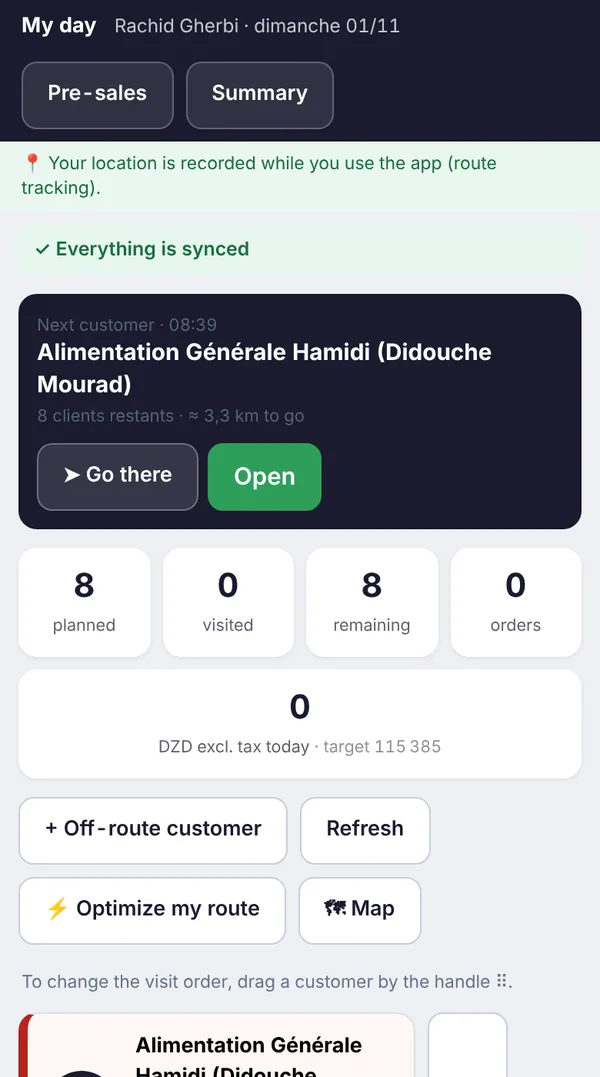
The rep installs the app on their phone (the Facturelle Terrain Android app, or “Add to home screen”). In the morning they see their van stock if they have one, then My day: customers to visit in order, the next customer on top, directions, kilometres and today's target. “Optimise my route” puts the remaining customers in the shortest order from the current position.
- Start the visit: the position is recorded; too far from the customer, a justification is required.
- Take the order: items, quantities, discount and the customer's signature. Prices are the customer's own: their category can follow a price list (wholesale, semi-wholesale…), and promotions apply. Above the rep's discount cap, the order goes to sales administration.
- No order: the rep closes the visit with a reason (enough stock, closed…) and can note observations and complaints.
- Spotted a new shop? Record it as a prospect; it becomes a customer without retyping.
No network, no problem: visits and orders are kept on the phone and sent as soon as the network returns, with no duplicates.
At the office: sales administration and delivery
- Pre-orders: depending on your setting, an order is validated at once or waits for sales administration, which approves it (in bulk), brings the discount back to the cap, or refuses it with a reason.
- Loading: delivery notes prepared and loading sheet printed.
- Field deliveries: orders are assigned to a driver for a given day. The driver adjusts delivered quantities, gets a signature, takes a photo and collects payment; the rest of a partial delivery can be reassigned.
- Van sales: with a loaded van, the rep invoices and issues stock on the spot.
- Field cash collection: the customer's open invoices are listed, the amount settles the oldest first, and a receipt is given.
- Customer returns: accepted (a credit note is prepared) or refused with a reason.
- Cash closing: in the evening the rep counts cash and cheques; sales administration records what it receives, and any difference must be explained.
Track the results
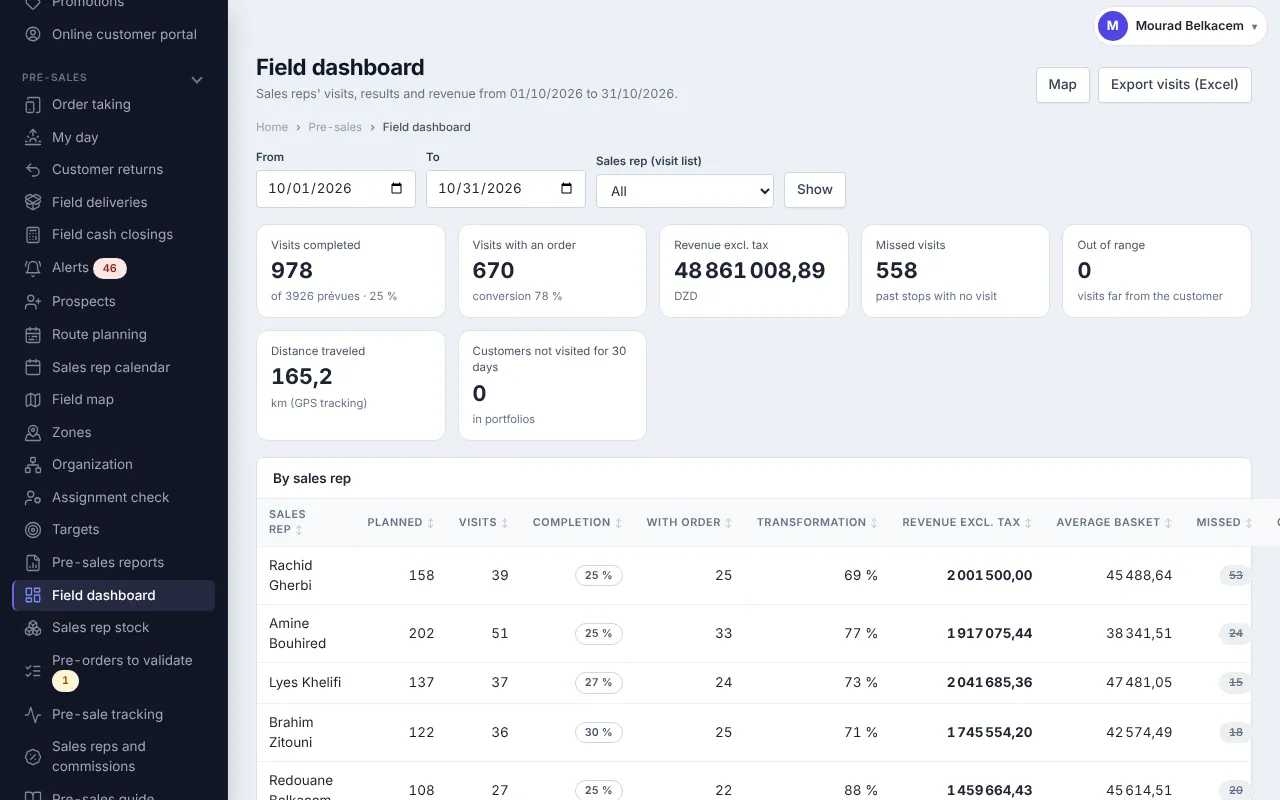
The field dashboard shows completed visits, visits with an order, sales, kilometres and achievement rate per rep and per team. The field map compares planned routes with actual tracks.
- Targets per rep, team or zone: sales, visits, new customers…
- Alerts: delays, cash differences, customers not visited.
- Reports in Excel and PDF, and sales reps' commissions.
Get started in 5 steps
- Create your account: 30-day free trial.
- Import your customers and items from Excel, then place customers on the map (“Locate address” or on-site reading).
- Create your reps, their zones and their routes.
- Choose “direct order” or “pre-order” mode and the discount caps.
- Install the Facturelle Terrain Android app on the reps' phones.
The built-in manual includes a field sales guide, role by role. Prices are on the Pricing page.
Frequently asked questions
Can reps take orders without an internet connection?
Yes. Visits and orders are kept on the phone and sent automatically when the network returns, with no duplicates.
How do I check that the rep actually visited the customer?
When the visit starts, the phone's position is recorded. If the rep is too far from the customer (adjustable radius), a justification is required.
Are wholesale and semi-wholesale prices applied?
Yes. Each customer category uses the standard price or a price list (a percentage of the selling price or custom prices), and promotions apply during order taking.
How do I limit discounts given in the field?
Each rep has a discount cap. Above it, the order goes to sales administration, which approves it, brings it back to the cap or refuses it.
Can I do van sales?
Yes. The van is a warehouse loaded each day: the rep invoices and issues stock on the spot, then closes the cash in the evening.
Do reps need a special phone?
No. An Android phone with the Facturelle Terrain app, or a recent browser with the app added to the home screen.
Can I try it for free?
Yes: 30-day free trial, nothing to install at the office.
Equip your reps this week
30-day free trial.