Inventory management software: know at any time what you have, where, and what it's worth
Stock-outs, overstock, count discrepancies, expired products: poorly tracked stock is expensive. With Facturelle, every receipt and every issue goes through a stock document, stock updates as you buy and sell, and clear reports tell you what to reorder and what to clear.
The principle: every movement goes through a document
In Facturelle, stock never moves “by itself”. Every receipt or issue goes through a stock document, first as a draft and then validated; only validation changes stock. A validated document can be put back to draft or cancelled with a reason, which cleanly reverses its movements.
- Goods receipt from a supplier, often created from the purchase order;
- stock entry for opening stock or a return;
- delivery note to a customer;
- stock issue with a reason: breakage, loss, internal use, sample, expiry;
- transfer between warehouses, return to supplier, stock count.
Sales, purchases and production create their documents automatically. By default, an issue larger than the available stock is refused, with the item, warehouse and available quantity shown.
Several warehouses, one view
Set up your shops, warehouses and even delivery vans as warehouses. Stock and average cost are tracked per warehouse, and the “Stock by warehouse” report shows where each item is. A transfer moves goods from one warehouse to another in a single document.
Each item's stock card shows its full history: date, document, in, out, balance and average cost.
Barcodes, phone scanning and labels
An item can have as many barcodes as needed, for example one for the unit and one for the carton. In every entry screen (sales, purchases, stock documents, stock counts), just scan:
- with a USB or Bluetooth handheld scanner on a computer;
- with the phone camera: the scan button appears on mobile, in continuous mode to scan item after item;
12*before scanning adds 12 units at once.
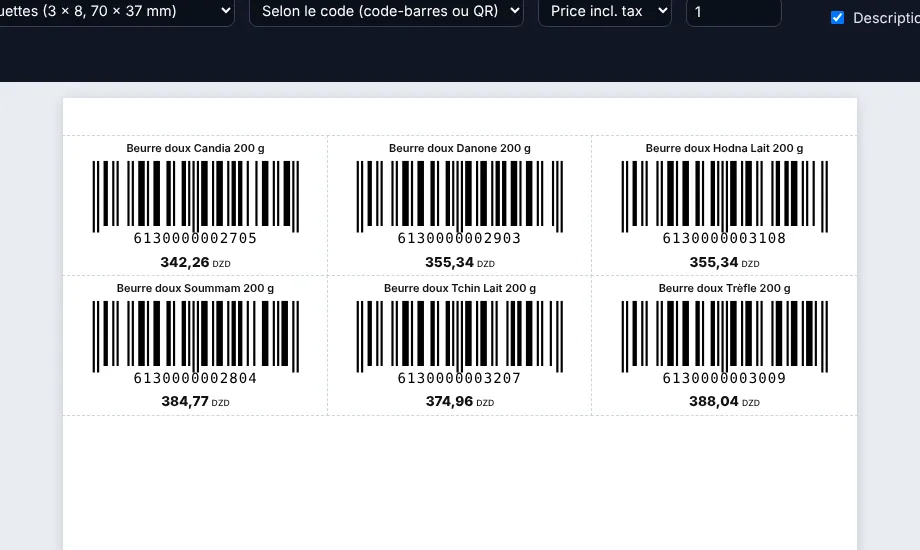
No barcodes on your items? Facturelle prints labels with a barcode (EAN-13, EAN-8 or Code 128) or QR code, item name and price excl. or incl. tax, on A4 sheets (24, 40 or 65 labels) or on a label printer (50 × 30 or 40 × 25 mm).
Pack sizes (carton of 12, pack of 6…) can be sold and bought directly: stock is always counted in the base unit.
Batches, expiry and valuation
For food, pharmacy or cosmetics, turn on batch tracking for the items concerned. On receipt you enter the batch number and expiry date; on issue you choose the batch or let Facturelle automatically issue the first to expire. A batch can be blocked so that it can no longer go out. The expiry report lists what is due.
Stock is valued at weighted average cost or FIFO (first in, first out), as the business chooses. This value drives the cost of issues, the stock value and your margins.
A stress-free physical count
- Open a count: date, warehouses, scope (all stock or some families).
- Prepare: a PDF count sheet, or counting teams that each count one area.
- Enter counted quantities by keyboard, by scanning, or by Excel import.
- Review differences in quantity and value, and flag items to recount.
- Validate: a count document sets stock to the counted quantity.
To fix a few recounted items during the year, a quick adjustment is enough.
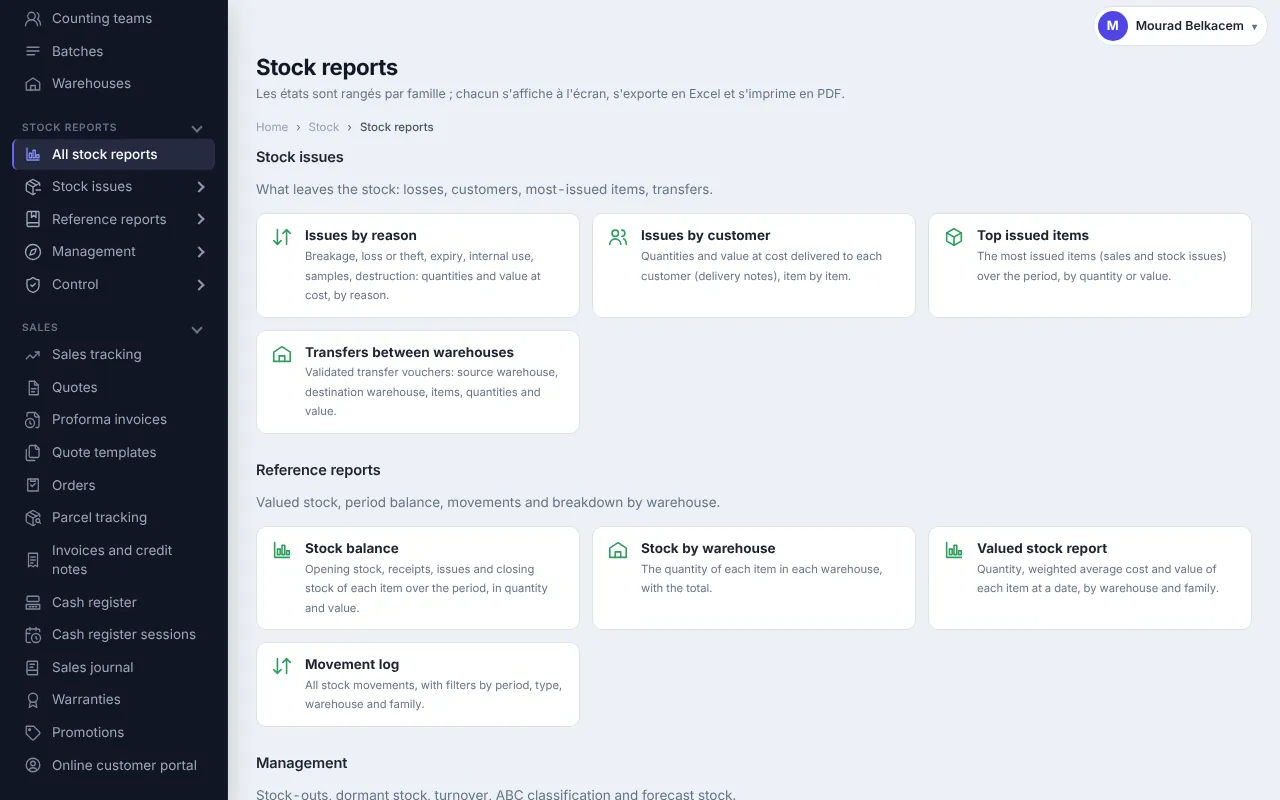
14 stock reports to decide
All can be filtered by period, warehouse or family, and exported to Excel and PDF:
- Issues: by reason, by customer, top outgoing items, transfers between warehouses.
- References: stock valuation, period balance, movement journal, stock by warehouse.
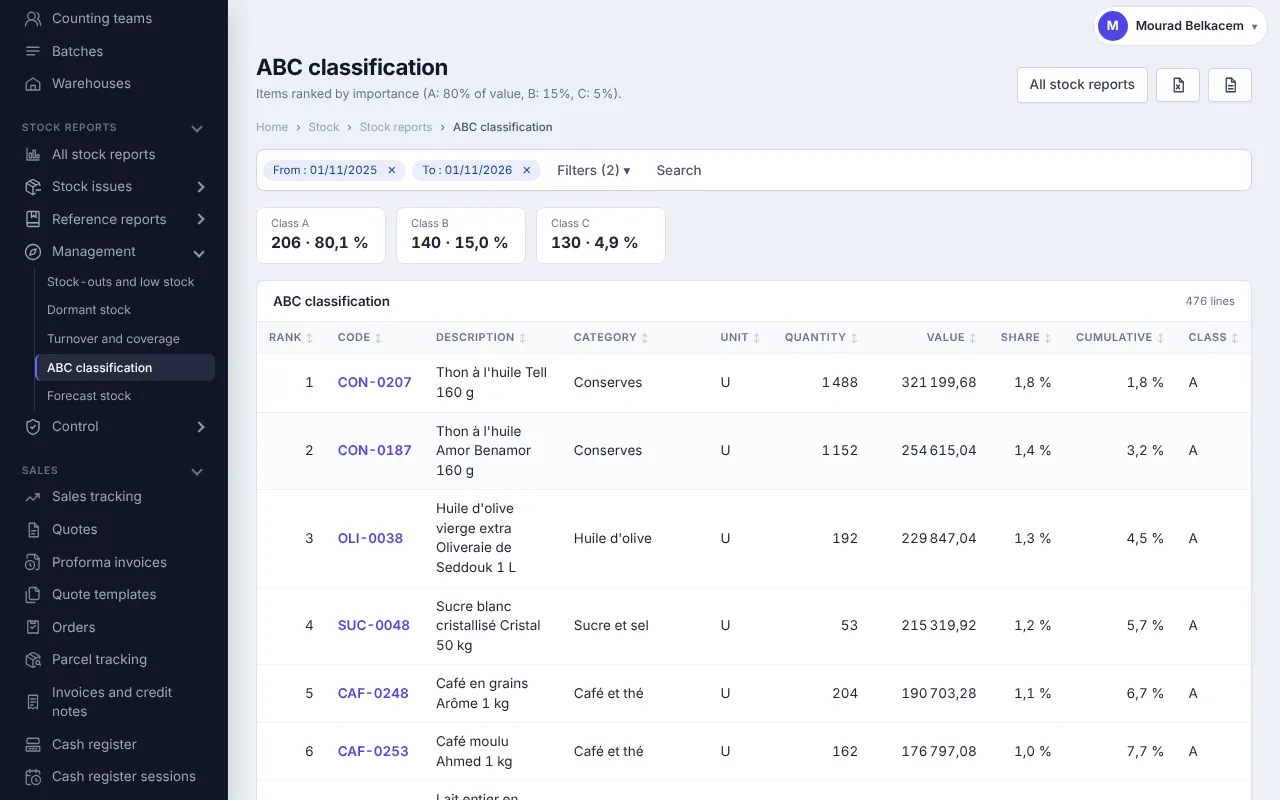
- Management: stock-outs and low stock (with a suggested order quantity), slow movers, turnover and coverage, ABC analysis, projected stock.
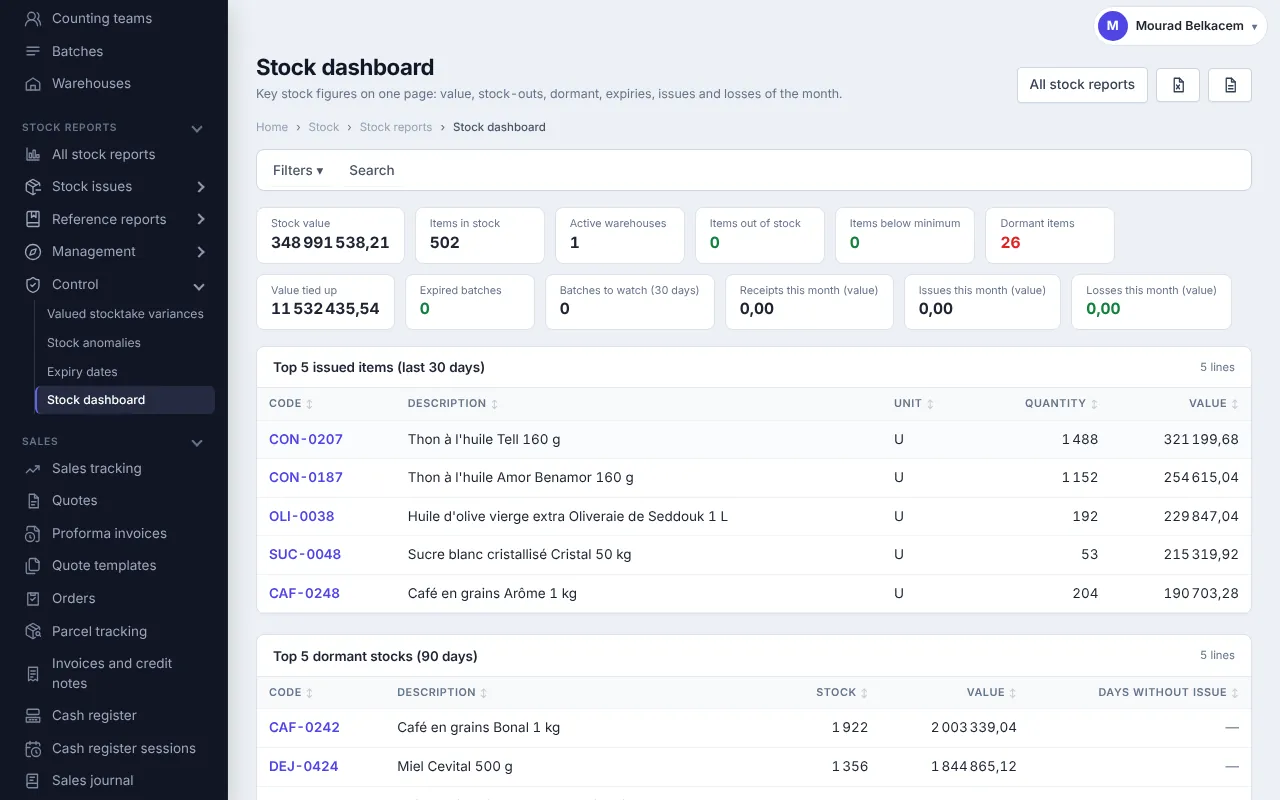
- Control: stock dashboard, count differences, anomalies, expiry dates.
Get started in 4 steps
- Create your account: 30-day free trial.
- Create your warehouses and import your items from Excel (families, units, prices, barcodes).
- Enter your opening stock with a stock entry or a first count.
- Sell and buy: stock follows on its own. Print labels for items without barcodes.
Selling online too? Your online store shows availability from the same stock. Prices are on the Pricing page.
Frequently asked questions
Can I manage several shops or warehouses?
Yes. Each warehouse (shop, warehouse, van) has its own stock and average cost, and transfers between them are made with a transfer document.
Do I need a handheld scanner?
No. A USB or Bluetooth scanner works on a computer, and on a phone the camera works as a scanner, in continuous mode.
Can I print my own barcode labels?
Yes: barcode or QR code, with item name and price, on A4 sheets of 24, 40 or 65 labels or on a label printer.
Does Facturelle handle expiry dates?
Yes, with batch tracking: batch number and expiry date on receipt, first-to-expire issued first, batch blocking, and an expiry report.
Which stock valuation method is used?
Weighted average cost or FIFO, as the business chooses, as long as no stock movement has been recorded.
Can stock go negative?
Not by default: an issue larger than stock is refused. You can allow it for the whole business or for some roles.
How does the year-end count work?
You open a physical count, count by teams (scanning, keyboard or Excel), check the differences, then validate: stock is adjusted.
Take back control of your stock
30-day free trial, nothing to install.