Invoicing software in Algeria: compliant invoices, from quote to payment
An Algerian invoice must show your tax identifiers, the right VAT and, for cash payments, the stamp duty. Facturelle takes care of it: you pick the customer and the items, and the software calculates, numbers and prints a clean invoice, ready to hand over or send.
What an invoice must show in Algeria
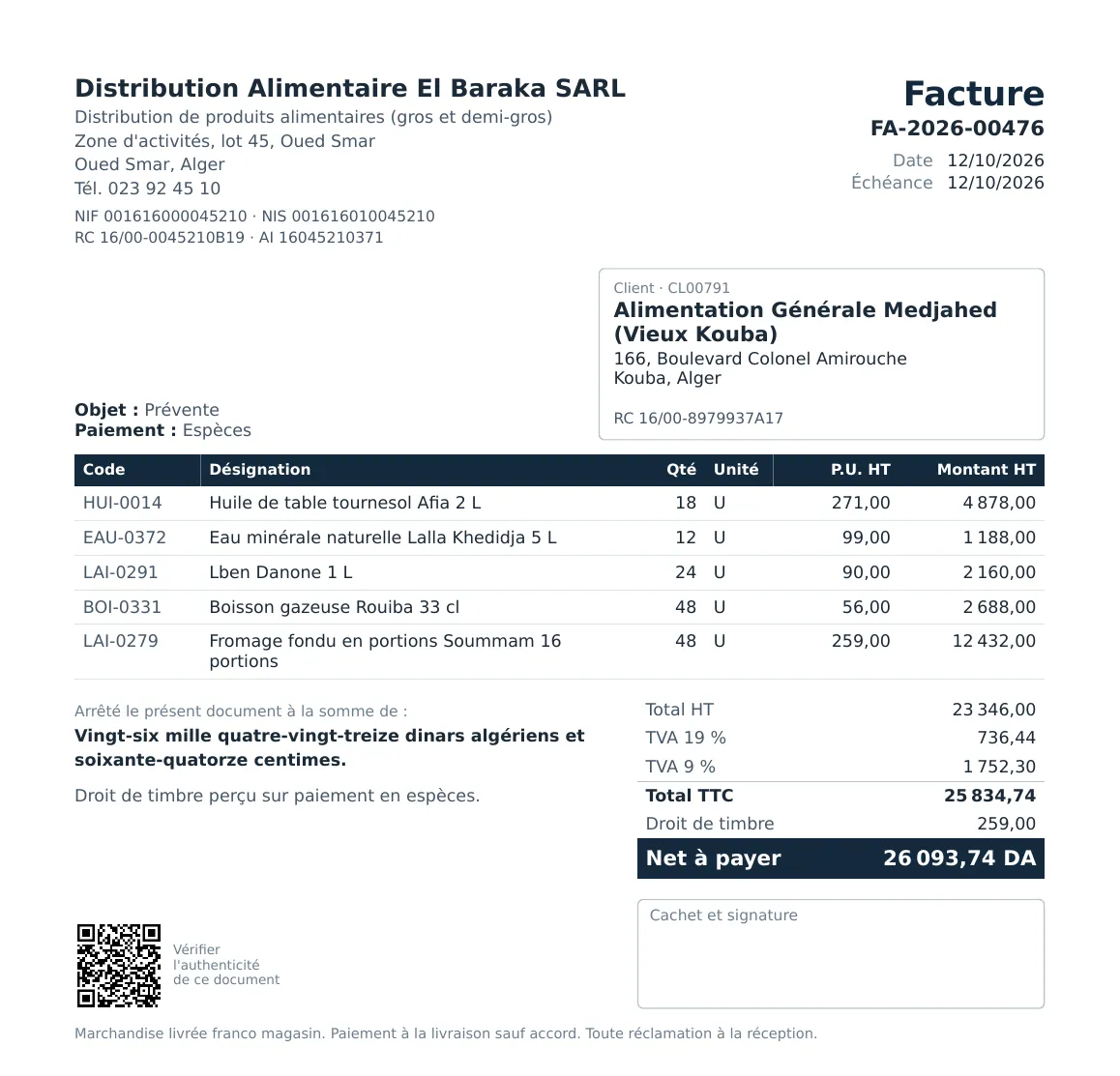
An invoice is judged first by its details. Facturelle fills them in automatically from your company record and the customer record:
- Your company: name, legal form, address, phone, NIF, NIS, RC, tax article (AI), and optionally bank, RIB, share capital, logo and stamp.
- The customer: name, address and their own identifiers (RC, NIF…). If they are missing from a customer record, Facturelle warns you before validation, without blocking you.
- The document: unique number, date, due date, payment method and terms, line details (code, description, quantity, unit, unit price excl. tax, discount, amount).
- The totals: total excl. tax, VAT per rate, total incl. tax, stamp duty when it applies, net payable and amount in words.
VAT and stamp duty calculated for you
VAT, per rate
Each item carries its VAT rate (19%, 9% or exempt). On an invoice that mixes rates, Facturelle shows one VAT line per rate. In the settings you choose whether VAT is calculated on the total per rate or line by line. A business under the IFU flat tax can work without invoiced VAT.
Stamp duty on cash payments
When an invoice is paid in cash, stamp duty is added to the net payable automatically, following the current scale (2025 finance law) kept up to date by Facturelle: exemption threshold, rate per bracket, 100 DA fractions and minimum charge. Real example above: 259.00 DA of stamp duty on an invoice of 25,834.74 DA incl. tax paid in cash. Payments by cheque or transfer carry no stamp duty.
Numbering, drafts and traceability
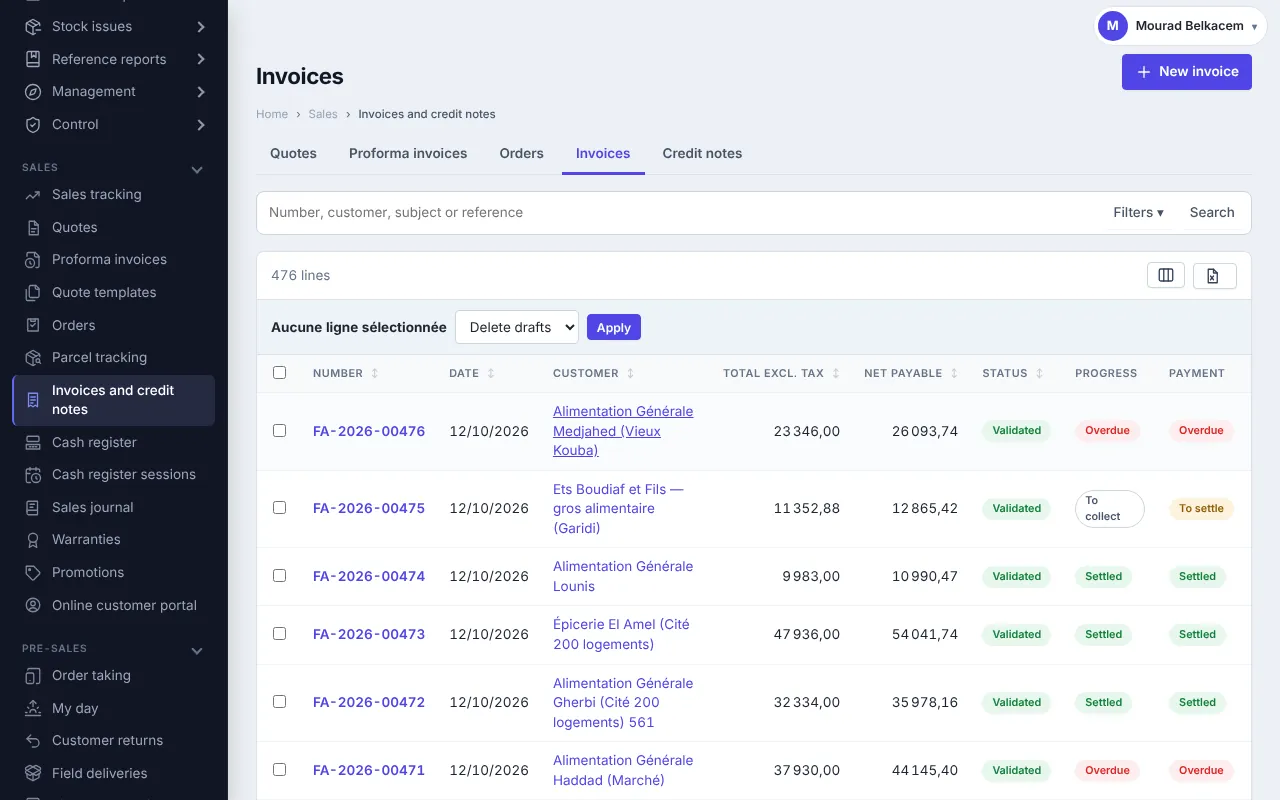
An invoice stays a draft until you validate it: everything can be changed, and a draft prints as a proforma. On validation it gets its final number, for example FA-2026-00476, right after the previous one.
- You decide how long a validated invoice may go back to draft: never, within 48 hours, during the invoice month, or without limit.
- An invoice is cancelled with a reason and corrected with a credit note (returned goods, commercial gesture), which can put items back in stock.
- Only an administrator can renumber a document, with a mandatory reason and a duplicate check.
- Every change is recorded in the document history.
From quote to invoice, without retyping
Facturelle covers the whole sales cycle. From a validated document, one button creates the next, carrying over the customer, the lines and the terms:
- Quote or proforma invoice, with a validity date;
- the customer's purchase order;
- one or more delivery notes (partial deliveries allowed);
- the invoice, then a credit note if needed.
A timeline at the top of each document shows where you stand: ordered, delivered, invoiced, paid. Once everything is delivered and invoiced, conversions stop, and a quantity above the order is flagged.
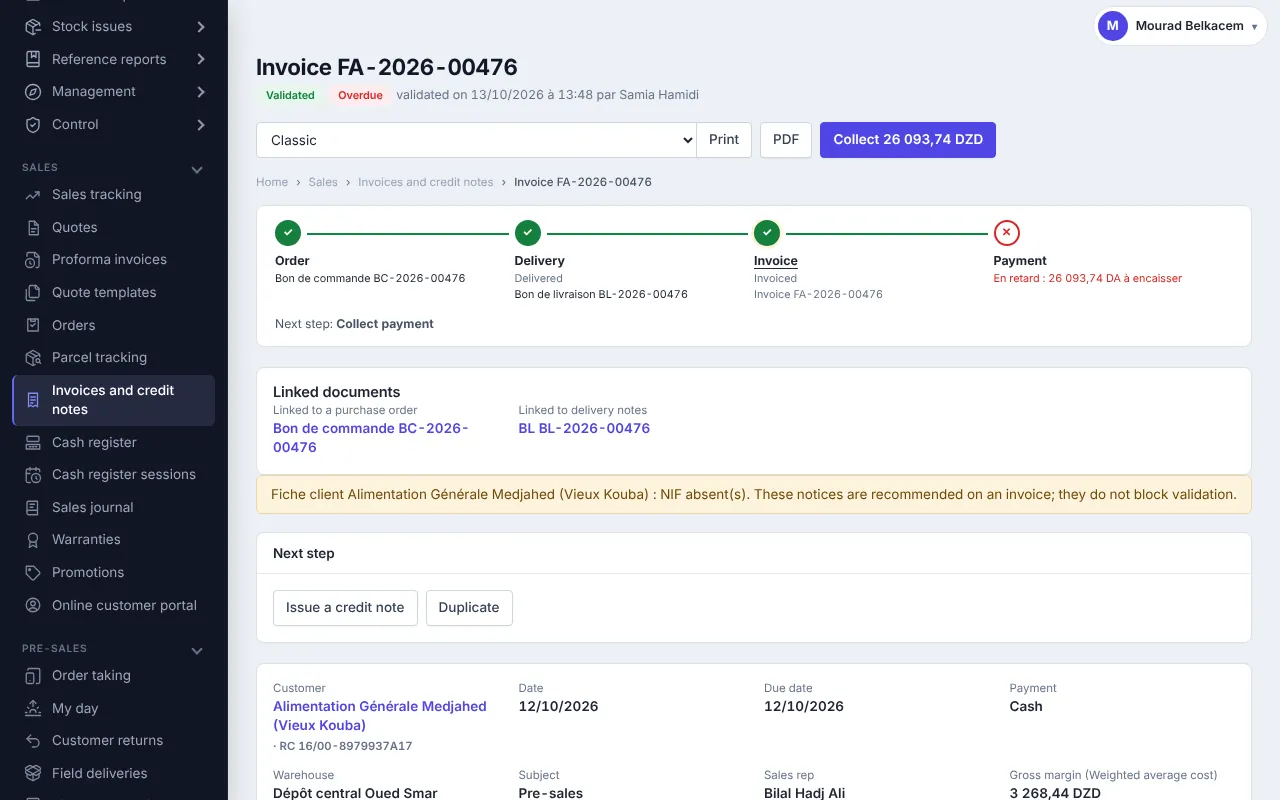
Entry is fast: type a few letters or scan a barcode, type 12* before scanning to add 12 units at once, and promotions apply by themselves. For a project quote, group lines into lots with a subtotal per lot.
Invoices that look like you, in French or bilingual
Pick the layout of your invoices, quotes and proformas: Classic, Modern, Compact, Services, Bilingual French / Arabic or an 80 mm receipt for the counter. Add your logo, stamp, colour, terms and conditions and a footer. A guided editor also lets you design your own templates.
Each invoice can carry a verification QR code: scanning it opens a page confirming that the document was really issued by your company.
Payments, reminders and figures for your accountant
- Payments: record full or partial payments; the invoice list shows what is paid, due or overdue.
- Receivables and reminders: see who owes you what, and since when.
- Sales journal: all invoices and credit notes for a period with amounts excl. tax, VAT, stamp duty and incl. tax, exportable for accounting.
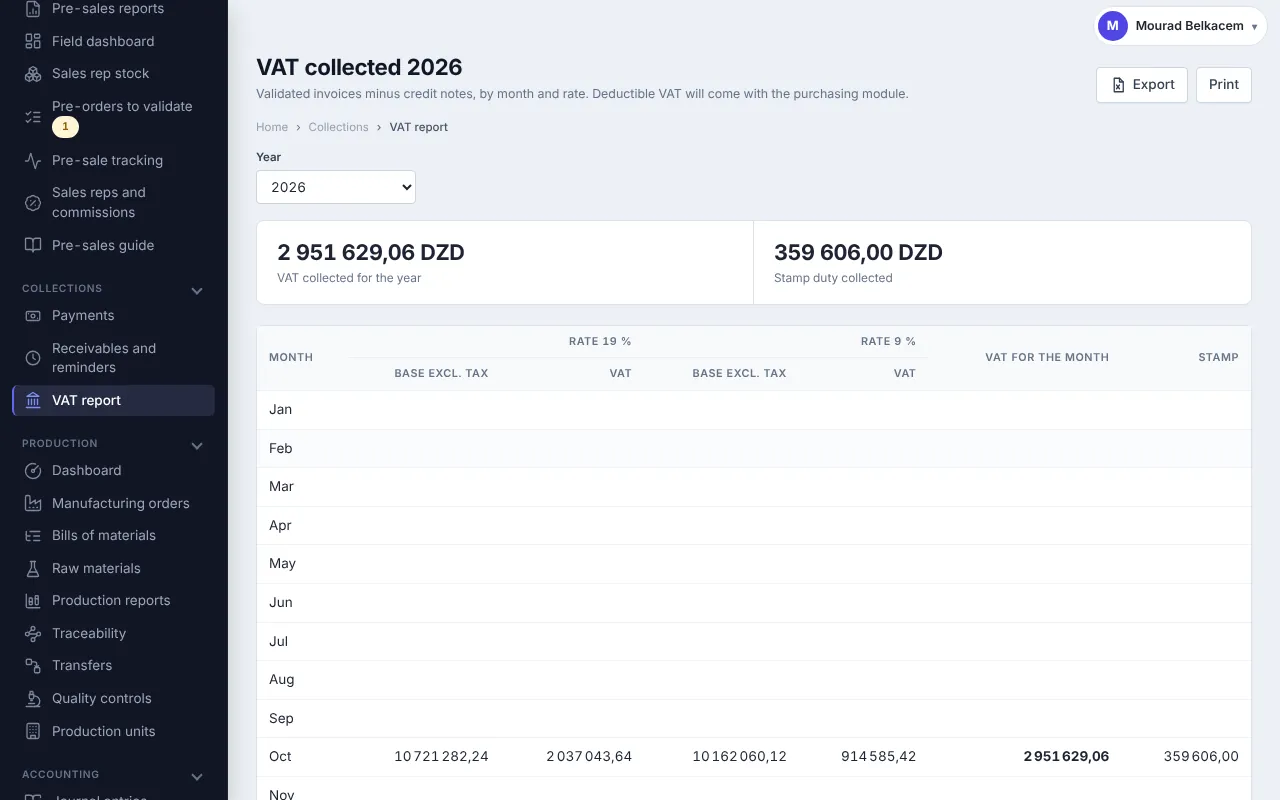
- VAT collected report: base and VAT per rate, month by month, with stamp duty, to export or print.
Get started in 4 steps
- Create your account: 30-day free trial.
- Fill in your company: name, address, NIF, NIS, RC, AI, logo and stamp.
- Import your customers and items from Excel, or create them as you invoice.
- Make your first quote, turn it into an invoice and print it.
Facturelle runs online, from a computer or a phone. A Windows version is also available. Prices are on the Pricing page.
Frequently asked questions
What does Facturelle print on an invoice?
Your company name, address, NIF, NIS, RC and tax article, the customer's details and identifiers, the number and date, the line details, VAT per rate, stamp duty when it applies, the net payable and the amount in words.
Is stamp duty calculated automatically?
Yes, for invoices paid in cash, following the 2025 finance law scale kept up to date by Facturelle. Payments by cheque or transfer carry none.
Can I invoice without VAT?
Yes. A business under the IFU flat tax works without invoiced VAT, and an item can also be VAT-exempt.
How do I correct a validated invoice?
Depending on your setting, you can put it back to draft within a set period (48 hours, the invoice month…). Otherwise you issue a credit note that cancels all or part of the invoice.
Can I print invoices in Arabic?
Yes, with the bilingual French / Arabic template, which uses your company name and address in Arabic. The application itself is available in French, English and Arabic.
Are invoices numbered without gaps?
The final number is given on validation, right after the previous one, per document type and per year. A draft has no number yet.
Can I try it for free?
Yes: 30-day free trial, nothing to install. A Windows trial version is also available.
Issue your first compliant invoice today
30-day free trial, nothing to install.